How to Make a Digital Vision Board on Your Phone (So You Actually See It Daily)
"A few pictures on a wall won't change anything." I honestly believed that. And if you've ever made a vision board, you may have proof: you spent an evening cutting and arranging, felt great for two days, and then never really looked at it again. The pictures were there, but there was no plan behind them — so eventually you started to wonder whether vision boards work at all.
They can. But the board has to do two things paper usually can't: stay in front of your eyes every day, and point to a specific action. A digital vision board on your phone solves the first problem almost for free. This guide solves the second one too.
Key takeaways
- A vision board only works if you see it daily — paper loses that fight, your phone wins it
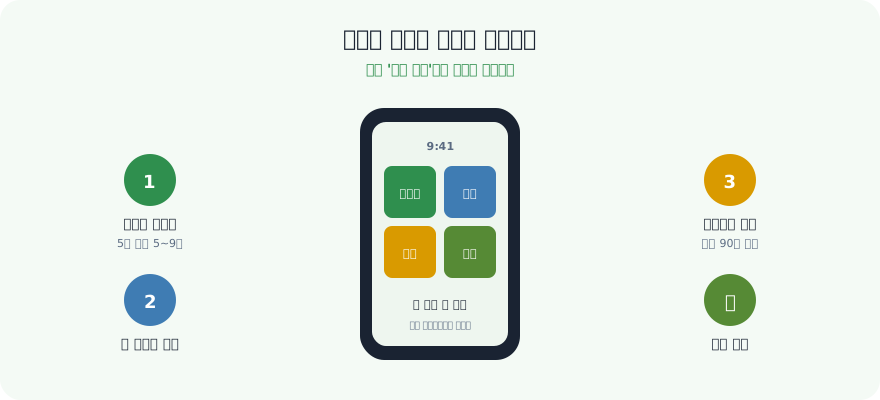
- Build it in 3 steps: collect 5–9 images → arrange them into one 9:16 image (1080×1920 px) → set it as your lock screen
- Pure positive fantasy can actually drain energy; pair each image with an obstacle and an if-then action
- Keep it alive with a 4-week routine and a 5-minute weekly check — not with more pictures
Why vision boards get made — and then abandoned
Almost every abandoned board fails for one of three reasons. Find yours before you build a new one.
| What happens | Why it happens | What to do instead |
|---|---|---|
| You never look at it again | It lives on a wall or in a folder you don't pass | Put it on the phone lock screen, where your eyes already go |
| It's all pictures, no plan | Images describe outcomes but not next steps | Attach one if-then action and one weekly metric to each image |
| You doubt it works | Nothing you can measure ever changed | Log one line a week — "what did this board make me do?" |
Why a digital vision board beats paper
A vision board is supposed to keep your goals visible so your daily choices bend toward them. Paper does this for about three days. Then it becomes wallpaper your brain edits out, stuck on a wall you're rarely staring at anyway. (Visualizing the future you want is the "Belief" in Success = Belief × Thinking × Action — but belief needs repetition to stick.)
| Paper vision board | Digital vision board |
|---|---|
| Lives on one wall you walk past | Lives on your phone — seen dozens of times a day |
| Runs out of space, hard to update | Swap an image in 10 seconds |
| Fades into the background in days | Lock screen forces a daily glance |
| Stays home | Goes everywhere you go |
A caution from the research: looking alone isn't enough
Psychologist Gabriele Oettingen at New York University has spent years studying what happens when people simply fantasize about a positive future. In several of her studies, people who only pictured the ideal outcome showed lower energy and weaker follow-through than people who also thought about what stood in the way. The mind seems to "taste" the success in advance and relax.
Her answer is mental contrasting: picture the wish, then the main obstacle, then a plan in the form "if [obstacle], then I will [action]" (often taught as WOOP — Wish, Outcome, Obstacle, Plan). That's the upgrade this guide makes to the classic vision board: every picture gets an obstacle and an if-then line. The board stops being a daydream and becomes a trigger.
How to make one in 3 steps
1. Collect the images (5–9, one per life area)
Pick pictures that represent the life you're building — one per area works well: career, learning, health, finances, relationships. Use real photos, screenshots, or a single word in bold. Prefer images that show you doing something (running shoes by the door, an open laptop with a draft) over pure trophies (a sports car, a beach). Don't over-collect; a board with 30 images says nothing.
2. Arrange them into one image (9:16, 1080×1920 px)
Use any free collage app, Canva's phone-wallpaper size, or your phone's built-in layout tool to combine them into a single 9:16 image. Keep the top third and the center calm — that's where the clock and notifications sit. If you want, add one sentence in the bottom third — your core vision in your own words. (This is the same clarity you'd give a SMART goal: specific enough to picture.)
3. Set it as your lock screen
This is the step most people skip, and it's the whole game. Save the collage and set it as your phone lock screen (and desktop wallpaper too, if you like). On iPhone (iOS 16 or later) you can even use Photo Shuffle to rotate a few board versions; many Android phones can also rotate several lock-screen images. Now you don't have to remember to look — your vision meets your eyes every time you pick up your phone.
Turn every image into an action: a 5-area example
Here is what a finished board's "back side" looks like. Write this in your notes app — one row per image.
| Area | Image | Obstacle | If-then action | Weekly metric |
|---|---|---|---|---|
| Career | A slide deck with your name on it | Evenings disappear into email | If I close my laptop at 6 p.m., then I spend 20 minutes on the portfolio first | 3 sessions / week |
| Learning | An open English book | "Too tired after work" | If I sit on the subway, then I read 5 pages before opening social media | 20 pages / week |
| Health | Running shoes by the door | Snooze button | If the alarm rings, then I put on the shoes before checking my phone | 3 runs / week |
| Finances | A savings balance screenshot | Impulse delivery orders | If I open a delivery app, then I first move the same amount into savings | Spending log 7/7 |
| Relationships | A family dinner photo | Weekends fill up | If it's Sunday morning, then I text one person I've been meaning to see | 1 meet-up / week |
The image pulls you; the if-then line tells you exactly what to do when the obstacle shows up. If you prefer a grid layout for this, the Mandalart planner breaks one core goal into 64 actions, and a career-focused vision board shows how to make the career row concrete.
A 4-week routine to keep seeing it
Even a great board goes invisible if it never changes. Use the first four weeks to wire it into your day.
| Week | Focus | Daily (under 1 minute) | Pass criterion |
|---|---|---|---|
| Week 1 | Visibility | 10-second glance at the lock screen before opening any app | 5 of 7 mornings |
| Week 2 | Action | Pick one image each morning and do its if-then action once | 4 of 7 days |
| Week 3 | Obstacles | When an obstacle appears, say the "if" out loud and do the "then" | Note 2 obstacles you beat |
| Week 4 | Refresh | Swap the one image that stopped pulling you | 1 image replaced + weekly check done |
Notice the pass criterion is never "7 of 7." If one missed morning feels like failure, the whole board goes back in the drawer — the exact pattern in how to beat the three-day quitting habit.
The 5-minute weekly check
Once a week, ask three questions and write one line each:
- Which image made me act this week? (Keep it.)
- Which image did I scroll past every time? (Swap it or rewrite its if-then line.)
- What's the one action for next week?
This fits neatly into a Sunday weekly review. After a month you'll have four lines of evidence — which is the honest answer to "do vision boards work?"
Which tool should you use?
| Tool | Good for | Weak spot |
|---|---|---|
| Phone's built-in photos / collage | Fastest start, free | No link to actions or progress |
| Canva | Beautiful layouts, ready wallpaper sizes | Stays a picture — tracking happens elsewhere |
| Collecting inspiration | Easy to over-collect; not a daily view | |
| Notion | Pairing images with goals and to-dos (Notion goal planner) | Setup takes time; not on your lock screen |
| VisionDream Dream Map | Vision, five areas, AI image and progress in one place | Works best when you check in daily |
🌱 Do it with VisionDream
This is exactly what the Dream Map in VisionDream is built for: one core vision sentence at the center, your five life areas (career, learning, health, finances, relationships) around it, an AI-generated vision board image, and a progress bar so your board isn't just pretty — it moves. Turn each if-then line into a habit in the Today tab, and the Sunday weekly review gives you the place to ask "which image made me act?" The tool is the app; the main character is still you.
Don't wait for the perfect board. Change your phone wallpaper tonight and build a mini vision board — one image, one line, one if-then. Plant your vision where your eyes already go, and the fruit will follow. 🌱
Frequently Asked Questions
What is a digital vision board?
A digital vision board is a collection of images representing the life and goals you're working toward, arranged into a single picture you keep on your phone or computer. Unlike a paper board stuck on a wall, a digital one lives on your lock screen, so you see your vision dozens of times a day without any effort.
How do I make a vision board on my phone?
Three steps: collect 5–9 images (one per life area works well), combine them into a single 9:16 image (1080×1920 px) with any free collage app or Canva, keeping the top third and center calm for the clock, and set that image as your phone lock screen. The lock screen step is the key — it turns your vision into something you glance at automatically all day.
Do digital vision boards actually work?
They work when you see them daily and tie each image to a concrete action. Research on mental contrasting by Gabriele Oettingen suggests that only fantasizing about success can lower energy, while adding the main obstacle and an if-then plan improves follow-through. So pair each picture with one obstacle and one if-then action, and check weekly which images actually made you act.
I made a vision board and never looked at it again. What went wrong?
Usually one of three things: it lived somewhere you don't look, it contained only outcome pictures with no next step, or nothing measurable ever changed so you stopped believing in it. Move it to your lock screen, attach one if-then action and one weekly metric to each image, and write one line every Sunday about which image made you act.
How often should I update my vision board?
Glance at it daily, check it weekly, and refresh it monthly. In the weekly check, swap or rewrite any image you scrolled past all week. Replacing one image a month is enough — the novelty makes your brain notice the board again without turning it into a new 30-picture project.
How does VisionDream help with a digital vision board?
VisionDream's Dream Map puts a core vision sentence at the center with your five life areas around it, generates an AI vision board image, and tracks progress. You can turn each image's if-then action into a habit in the Today tab and use the Sunday weekly review to see which areas moved, so your board drives action instead of gathering dust.
Plant a vision, and fruit will surely grow 🌱
Start in the app →Related posts
- 🎓How to Make a Career Vision Board — Skip the Pretty Photos, Fill In the Boxes (for Students & Job Seekers)
- 📲Goal-Tracking Apps — How to Pick One and Actually Finish Your Yearly Goals
- ⏰How to Stop Procrastinating — Break the Habit With Systems, Not Willpower
- 🌄5 Miracle Mindsets That Change Your Morning — Why Willpower Fails and What Works Instead