Build a Goal Planner in Notion (Year → Month → Week, Actually Connected)
"Get healthy." "Grow the business." These feel like plans, but they're too big to start — and a goal you can't start is a goal you'll forget. If you've ever built a gorgeous planner and quietly abandoned it after a few days, the culprit usually isn't your discipline or your template. It's that your yearly, monthly, and weekly plans live in separate boxes that never talk to each other.
A big goal only becomes real when it's broken down to the size of today's task. That's exactly what a connected planner does: it carries one yearly goal down through the month and the week until it lands on something you can actually do this afternoon. Notion is a great place to build it, because everything links.
Key takeaways
- "Get healthy" feels impossible because it's too big — shrink it to today's-task size
- Most planners fail because year, month, and week aren't linked, not because they're ugly
- Build one master goal database and let month and week views filter from it
- The point isn't a pretty template — it's that a big goal reliably becomes today's action
Why the pretty planner stops working
Watch how most planners die. You set a shiny yearly goal in January. February's monthly page is a blank grid you fill with whatever's on your mind. This week's to-do list is whatever screamed loudest this morning. Three separate documents, three separate moods — and none of them point at each other. So the yearly goal sits on page one, untouched, while your weeks fill up with busywork that has nothing to do with it.
A planner isn't a diary; it's a delivery system that moves a goal from "someday" to "today." If the year doesn't reach the week, the delivery never happens. (Turning a vague wish into something concrete is the "Thinking" step in Success = Belief × Thinking × Action.)
| Disconnected planner | Connected planner |
|---|---|
| Year, month, week are separate docs | One goal flows down all three levels |
| Weekly list = whatever's loudest today | Weekly list = this month's goal, sliced |
| "Did I move my yearly goal?" — no idea | Every week visibly serves the year |
| Pretty for 3 days, then ignored | Reopened because it drives today |
Build it in Notion: 4 connected levels
The whole trick is one source of truth — a single goal database — with month and week as filtered views of it, not separate lists.
1. Create one master goal database
Make a database called Goals. Add properties: Title, Level (select: Year / Month / Week), Parent goal (a relation pointing back to the same database), Status, and Due. That Parent goal relation is the magic — it's what lets a weekly goal remember which monthly goal it belongs to, and which yearly goal above that.
2. Write 3–5 yearly goals, then break each into months
Set Level = Year for your handful of big goals. For each one, ask: "What has to be true by the end of this month for this to happen?" Create those as Level = Month entries and set their Parent goal to the yearly one. A year goal of "run a 10k" becomes March's "run 3km without stopping."
3. Slice this month into weekly one-things
Take the current month's goal and cut it into weeks. Each week gets one clear target — its "one thing" — as a Level = Week entry whose Parent goal is the month. "Run 3km this month" becomes "add 500m to my long run this week."
4. Pull the week down to today
Create a filtered view — This week — that shows only Level = Week items due now. Every morning, your job is tiny: turn this week's one thing into one action for today. The big goal is already three cuts smaller; today's task is finally graspable.
Example: from "get healthy" to this afternoon
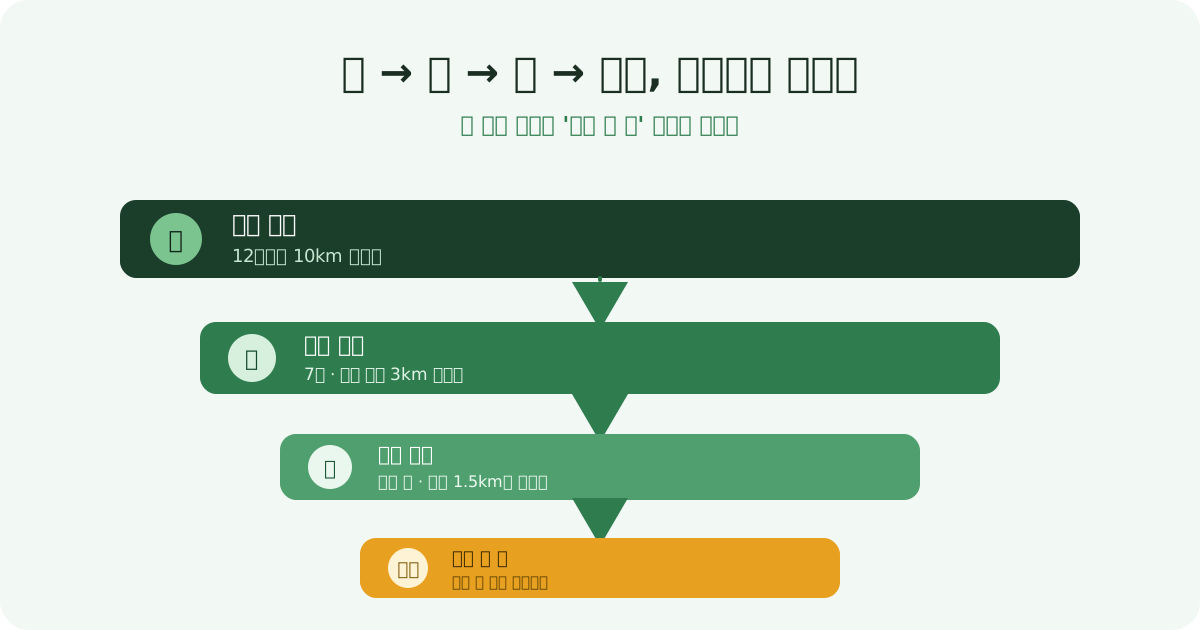
Year: Run a 10k by December. Month (July): Run 3km without stopping. Week: Extend my long run to 1.5km. Today: Jog the loop around the park, once.
Notice the last line does all the work. The yearly goal set the direction; the parent-goal links carried it down; but it's "jog the loop, once" that you actually do. A planner that stops one level short — at the week — is a planner you'll admire and ignore. Push it all the way to today. (Working backward from the deadline like this is backcasting, and each level can be sharpened with a SMART goal.)
Which Notion template should you actually pick (3 types)
Search "goal tracker" in the Notion template gallery and hundreds show up. The real problem isn't the count — it's that mixing templates with different structures breaks the 4-level chain above. In practice, templates fall into three types.
| Type | Strength | Weakness | Fit with this structure |
|---|---|---|---|
| GTD-style to-do list | Fastest to log today's task | Goal-to-task link is manual, hard to trace back up | Low — no Parent goal relation, so the 4 levels disconnect |
| Calendar / time-block | Time layout is visible at a glance | Shows "when" but not "why" | Medium — pairs well with time blocking |
| Relational database | Parent goal auto-links year → month → week → today | Takes longer to set up the properties | High — same structure this article builds |
Don't pick just one — use the relational database as the backbone and add a calendar view on top, filtered into "this week." If you've spent more than a day picking a template, that's the signal itself: stop searching for the perfect one and build the 4 steps above in 20 minutes instead.
Why your habit-tracking app data never makes it into Notion
The second wall people hit: habit or workout data logged in another app doesn't flow into Notion. Most step counters and workout apps don't integrate with Notion directly, so you either bolt on an automation tool like Zapier or copy numbers in by hand — and hand-copying rarely survives three days. The result: your planner's "today" cell sits empty while the real record lives somewhere else.
This isn't a problem you fix by designing Notion harder. The goal (where you're headed) and the execution record (what you actually did today) need to live in the same place from the start. For narrowing down to one tracking tool, see how to use a habit tracker; if you're weighing apps, comparing goal-tracking apps lays out the criteria.
🌱 Run it in VisionDream
Building this in Notion teaches the structure; keeping it alive every day is the hard part. VisionDream is built around this exact ladder — its 4-level planner (yearly, monthly, weekly, daily) links each item to its parent goal automatically, so a yearly goal always shows up as something on today's list. Daily tasks carry an A/B/C priority, unfinished ones roll over on their own, and each week asks for a single weekly one-thing — the same "one cut per level" idea, without wiring relations by hand. Best of all, the Today tab's belief/thought/action checks and calendar heatmap live in the same place, so the "records scattered across apps" problem above never happens. If you'd rather see the goal as an image, building a visual vision board uses the same 5-area structure. The structure is yours; the app just keeps the year reaching your today. Plant your vision, and the fruit will come. 🌱
Frequently Asked Questions
Why do I keep abandoning my planner after a few days?
Usually it's not discipline or the template — it's that your yearly, monthly, and weekly plans aren't connected. When the year never reaches the week, your daily list fills with busywork unrelated to your real goals, so the planner feels pointless and you stop opening it. Linking the levels fixes this.
How do I connect yearly, monthly, and weekly goals in Notion?
Build one master 'Goals' database with a 'Level' property (Year/Month/Week) and a 'Parent goal' relation that points back to the same database. Set each monthly goal's parent to a yearly goal, and each weekly goal's parent to a monthly one. Then create filtered views so 'this month' and 'this week' pull from the same source instead of being separate lists.
What's the most important step so a big goal actually gets done?
Pushing it all the way down to today's task. A big goal like 'run a 10k' has to be cut through month and week until it becomes something small and concrete you can do this afternoon, like 'jog the loop once.' A planner that stops at the weekly level is one you'll admire but never act on.
How does VisionDream help with a connected planner?
Its 4-level planner (yearly, monthly, weekly, daily) links each item to its parent goal automatically, so a yearly goal always appears as something on today's list. Daily tasks get an A/B/C priority, unfinished ones roll over on their own, and each week asks for a single weekly one-thing — the same structure you'd build in Notion, maintained for you.
There are so many Notion goal templates — which one should I pick?
Don't settle for just one of the three types (GTD-style to-do list, calendar/time-block, or relational database) — use a relational database as the backbone. The other two either link goals to tasks manually or hide the 'why,' which breaks this article's 4-level chain. If you've spent more than a day picking a template, building the 4 steps yourself in 20 minutes is faster.
Can I connect my habit or workout tracking app data to Notion?
Most habit and workout apps don't integrate with Notion directly, so you need an automation tool like Zapier or manual entry — and manual entry rarely survives more than a few days. The real fix isn't a smarter Notion design; it's keeping the goal and the execution record in the same place, which is why VisionDream's Today tab handles belief/thought/action checks and the record on one screen.
Plant a vision, and fruit will surely grow 🌱
Start in the app →Related posts
- 📲Goal-Tracking Apps — How to Pick One and Actually Finish Your Yearly Goals
- ⏰How to Stop Procrastinating — Break the Habit With Systems, Not Willpower
- 🖼️How to Make a Digital Vision Board on Your Phone (So You Actually See It Daily)
- 🌄5 Miracle Mindsets That Change Your Morning — Why Willpower Fails and What Works Instead