Time Blocking — Why Your To-Do List Keeps Failing You (The 60/40 Rule and a 5-Step Day)
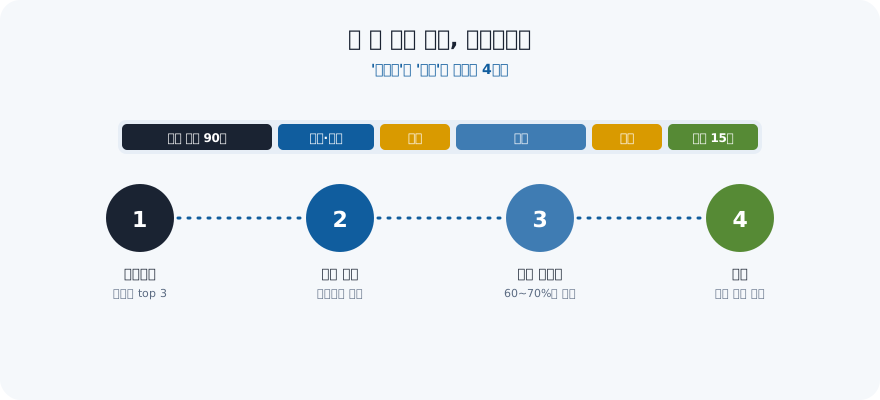
"This week I'll really focus." You wrote the list. You even starred the important ones. And yet at 6pm the big task is still untouched, buried under a dozen small ones you "just knocked out."
That's not a discipline problem — it's a design flaw. "I'll work hard" gives your brain no information at all. When, where, what — all three blanks are empty. A to-do list answers what, but never when. Time blocking fills in the blanks: it gives each task a specific home on your calendar, so the work that matters gets defended time instead of leftover time.
Key takeaways
- A to-do list names what; time blocking names when — that's the missing half
- Open lists let urgent-but-small tasks crowd out important-but-big ones
- Use three block sizes — 25, 50, and 90 minutes (one deep block a day is plenty)
- The 60/40 rule: block only 60–70% of your hours — in an 8-hour day, 5 hours blocked, 3 hours buffer
- Missing one block isn't failure. The only rule: never miss twice in a row
- Blocks must connect to your vision, or you've just built a prettier to-do list
| To-do list | Time blocking |
|---|---|
| Tells you what | Tells you what and when |
| Infinite — never "done" | Finite — only fits the day's hours |
| Urgent wins by default | You decide what gets defended time |
| Easy to add, hard to finish | Forces real prioritization |
| Ends the day with unchecked items | Ends the day with kept promises |
| Measures intentions | Measures hours — the actually scarce thing |
Why an open list quietly fails
A to-do list has no walls. You can add to it forever, and nothing on it competes for the same minute — so your brain reaches for whatever is quickest and loudest. The two-minute reply beats the two-hour deep work every time, not because it matters more, but because it's easier to start. By evening you've been busy all day and moved nothing important. A list measures intentions; a calendar measures the one thing that's actually scarce — your hours. (This is the Action in Belief × Thinking × Action — turning a plan into protected time.)
There's evidence behind this. Psychologists call it an implementation intention: writing down in advance when, where, and what you'll do. Studies have repeatedly found that people who write that one sentence follow through at roughly twice the rate of people who only hold the same goal in mind. "Exercise more" doesn't happen; "Tuesday 7pm, the park by my house, 20-minute walk" does. Time blocking is that sentence stretched across a whole day.
On the other side sits switching cost. In observational studies of office workers, it took an average of about 23 minutes to fully return to a task after an interruption. Get pulled away six times and you've spent over two hours just coming back. What a block really does is decide in advance how many times a day you'll be interrupted.
Find your sharpest hours before you place anything
Place the deep block where your head is clearest, not where the workday happens to start. Most people put their hardest task at 9am because that's when work begins, fail at it for two weeks, and conclude that time blocking doesn't work for them. It wasn't the method — it was the slot.
Run a three-day energy log first. It costs about 90 seconds a day. Set four alarms — 10:00, 13:00, 15:30, 20:00 — and at each one write two things: a 1-to-5 score for mental clarity, and one word for what you were doing.
| Day | 10:00 | 13:00 | 15:30 | 20:00 |
|---|---|---|---|---|
| Mon | 4 · email | 2 · post-lunch fog | 3 · meeting | 4 · quiet house |
| Tue | 5 · writing | 2 · admin | 2 · slump | 3 · reading |
| Wed | 4 · meeting | 3 · walk | 2 · slump | 4 · quiet house |
Three days is enough to read two things off it.
- Your peak band — the hours scoring 4 or 5 on at least two of the three days. That band gets the 90-minute deep block, and nothing else is allowed to book it.
- Your trough — the hours scoring 2. Never put creative work there. Fill it with admin, filing, tidying, or a walk. For most people the trough lands somewhere between 13:30 and 16:00; if yours is at 10am, your day is inverted and morning deep blocks will keep failing no matter how disciplined you are.
One caution before you redesign anything: if nearly every reading is a 2 or a 3, this isn't a scheduling problem. That's a recovery problem — sleep debt, load, or burnout — and no calendar layout fixes it. Start there instead. And if the log looks fine but you still don't believe you can hold a 90-minute block, the missing ingredient is evidence, not willpower: keep three small blocks and let them accumulate, the way self-efficacy is built from completed reps rather than pep talks.
Use three sizes of block
If every block is the same length, your day turns rigid. Match the size to the work.
| Block | Length | What goes in it | Per day |
|---|---|---|---|
| Sprint | 25 min | Starting something you've been avoiding, one phone call, admin | 2–4 |
| Standard | 50 min | A document, one study unit, research | 2–3 |
| Deep | 90 min | Your hardest creative work — designing, writing, analyzing | 1 (2 max) |
The 90 minutes isn't arbitrary. Alertness doesn't stay flat all day; it rises and falls in cycles of roughly 90 minutes. Give one whole rising phase to your hardest work, then spend 15 minutes recovering (away from the screen, water, a short walk). Stack two deep blocks back to back and the second one is almost always an imitation of work. The 25-minute sprint is the best cure for procrastination — 25 minutes is short enough that starting costs nothing.
Time blocking vs. four other systems — choose by symptom, not by fashion
These five aren't rivals; they answer different questions. Picking by symptom saves you from adopting a method that was never designed for your problem.
| System | What it decides | Adopt it when | It fails when |
|---|---|---|---|
| To-do list | What | Tasks are short, independent, and countable | The important work needs uninterrupted hours |
| Time blocking | What + when | Your day has roughly fixed hours and mixed work | Your day is genuinely interrupt-driven |
| Time boxing | What + when + a hard stop | The task is infinite — research, editing, tidying | The work honestly needs more time and you cut it anyway |
| Pomodoro (25/5) | The rhythm inside one block | Starting is the problem, not focusing | The work needs 90 unbroken minutes and the timer keeps cutting it |
| Day theming | Which day, not which hour | You juggle three or more roles | Something can't wait a week for its day to come around |
Time blocking and time boxing get confused constantly. Blocking says "this task lives from 9:10 to 10:40." Boxing adds "and when 10:40 comes, I stop whether or not it's finished." That hard stop is the antidote to what's known as Parkinson's Law — work expands to fill the time allotted to it. Give a tidy-up job an open afternoon and it takes the afternoon; give it a 30-minute box and it usually ends in 30.
The realistic stack for most people is three layers: day theming for the week, time blocking for the day, and Pomodoro inside the one block you keep avoiding. If you can only adopt one thing, adopt blocking. If you can only add one thing inside blocking, add the hard stop.
Designing the day in 5 steps
- Pick the day's top 3 (30 seconds). Before touching the calendar, decide what must move today. Not ten things — three. (If your goals are vague, make them SMART first so you know what a "win" even looks like.)
- Nail down the deep block first, in your sharpest hours. Don't slot it into what's left over — place it first and build the day around it. For most people that's 2–4 hours after waking.
- Batch admin into exactly two windows. Email, messages, approvals — don't let them leak across the whole day. Put them at, say, 1:00pm and 4:30pm. The point isn't checking less often; it's fixing the times.
- Put the finish line in the block's name. "Work" (no) → "Write report draft" (closer) → "Draft 3 pages of the proposal" (yes). Verb + object + done-condition. A vague block invites drift; a block with a finish line tells you the exact moment you kept the promise.
- Spend the last 10 minutes booking tomorrow's blocks. Tomorrow-morning you should have nothing left to decide. Attach those 10 minutes to your evening routine and it runs without willpower.
Name the block so it can be finished — eight rewrites
If the name doesn't say when you're done, the block will drift. The formula is three parts: verb + object + amount or stop condition. Here are eight names taken from real calendars and rewritten.
| Vague name | Rewritten with a finish line | Why the rewrite holds |
|---|---|---|
| Work on the report | Draft sections 1–3 of the report — no editing | Names the part and forbids the tempting detour |
| Study | Finish 12 problems in chapter 4 | Countable; you know at minute 40 whether you're behind |
| Research competitors | Fill a 3-row table: price, plan, support | Defines the shape of the output, not the activity |
| Inbox to zero, replies under 5 lines each | A stop condition plus a length cap | |
| Plan the project | Write the 5 milestones and their dates | Turns thinking into a countable artifact |
| Exercise | 20-minute walk, same route | Removes every decision except starting |
| Practice English | Shadow 10 sentences, 3 reps each | Reps beat duration for skill work |
| Think about the launch | List 10 likely objections + one answer each | Makes invisible work visible and finishable |
The test: could someone glance at your screen at the end of the block and say yes or no? If they couldn't, the name needs a number in it. Blocks named with a verb and a number also make the block audit later in this article possible — you can't score "worked on the report."
The 1.5x rule — plan against your own optimism
Estimate honestly, then book 1.5 times that. Everyone underestimates; the tendency is well known enough to have a name — the planning fallacy. Arguing with it wastes years. Budgeting for it takes one multiplication.
| Task type | What you'll estimate | What to actually book |
|---|---|---|
| Done it 10+ times before | 30 min | 30–35 min (x1.0–1.2 — you're accurate here) |
| One unknown in it | 60 min | 90 min (x1.5) |
| Waiting on another person's reply | 60 min | Two 45-min blocks on different days |
| First time doing it at all | 60 min | 120 min, split as "explore 45" + "do 75" |
| Creative work with no template | 90 min | 90 min plus a named continuation block |
Note the asymmetry that makes rounding up the obvious move: under-booking costs you the rest of the day — one overrun topples every block behind it — while over-booking costs you at most the surplus, which you hand to the next block or to the buffer. The downside is not symmetrical, so stop trying to be exact and be generous instead.
After two weeks you can replace the 1.5 with your own number. Log ten tasks with two columns, estimate and actual, then take the median of actual ÷ estimate. That's your personal multiplier. If it comes out at 1.8, stop debating it and use 1.8 — most people find theirs sits between 1.3 and 2.0, and it's stable enough to plan with. Two useful refinements: your multiplier is usually near 1.0 for repeated work and worst for anything creative or dependent on someone else, and it climbs on days with more than three meetings because the estimate ignored the re-orientation time between them.
What a real day looks like (9-to-6 example)
| Time | Block | Type |
|---|---|---|
| 09:00–09:10 | Pick today's top 3 + scan the calendar | Startup |
| 09:10–10:40 | Draft 3 pages of the proposal | Deep 90 |
| 10:40–11:00 | Recover (off-screen, water, short walk) | Buffer |
| 11:00–11:50 | Team meeting | Fixed |
| 11:50–12:00 | Write the 3-line meeting takeaway | Buffer |
| 13:00–13:30 | Email and messages, batched | Admin |
| 13:30–14:20 | Clean up the data | Standard 50 |
| 14:20–15:00 | Open buffer (overruns, surprise requests) | Buffer |
| 15:00–15:50 | Review and revise the proposal | Standard 50 |
| 16:00–16:25 | Make the call you've been putting off | Sprint 25 |
| 16:30–17:00 | Email and messages, round two | Admin |
| 17:30–17:40 | Close the day + book tomorrow's blocks | Wrap |
Actual blocked time: about 5 hours 20 minutes. The remaining ~3 hours are buffer, transitions, and slack — roughly 60% of a nine-hour day. It looks like too little. It is also the version of the day that survives to the end, unlike the one packed wall to wall.
Shift work, freelancing, small kids? Change the clock times, keep three principles: one deep block in your sharpest hours, admin at two fixed times, and 30–40% of the day left empty. For some people the best deep block in the world is 9:00–10:30pm, after the kids are asleep.
Meeting-heavy office vs. fully remote — same principles, opposite dangers
The two most common working shapes fail for opposite reasons, so they need opposite first moves. In an office, other people take your peak hours. At home, nobody takes anything — including the start and end of the day.
| Meeting-heavy office | Fully remote / working from home | |
|---|---|---|
| The main threat | Other people book your clearest hours | No boundary — the day neither starts nor ends |
| First move | Put the deep block on the calendar as a recurring event, 2–3 weeks ahead | Fix a 2-minute start ritual and a hard-stop alarm |
| Usual block size | 50 min more often than 90 | 90 min is realistic |
| Admin windows | Immediately after each meeting cluster | Fixed at 12:00 and 17:30 |
| The biggest leak | ~10 minutes of re-orientation after every meeting | Household tasks bleeding into work blocks |
| Buffer placement | 10 min after every meeting | One 40-min open buffer mid-afternoon |
| Rescue move | The three decline lines below | Change location for the deep block |
| How the day ends | Meeting notes converted within 10 min | A written stop: "tomorrow starts with X" |
For the office version, the whole game is the calendar being visible. A block that exists as a real event with a name gets respected far more often than an intention you hold privately, and three sentences cover almost every collision:
- "I have a hard commitment from 9:10 to 10:40 — could we do 11:00, or tomorrow morning?"
- "I don't need the whole meeting — can I join for the first 15 minutes and pick the rest up from the notes?"
- "Could this be a 5-line message instead?"
Ask the third question consistently for two weeks and you'll find out how many of your recurring invitations were reports rather than discussions. For the remote version, the equivalent leverage is physical rather than social: move seats for the deep block, keep one surface that only exists for work, and let the end-of-day alarm be non-negotiable. Working from home fails at the stop, not at the start.
The 60/40 rule — leave buffers or the plan breaks by 10am
The number one reason time blocking fails is that people schedule themselves like robots, back to back, with no slack. Then one call runs long and the whole day topples like dominoes. Real days have friction.
A number makes it easy to keep: block only 60–70% of your hours. In an eight-hour day that's 5 hours blocked, 3 hours buffer, split like this:
- 10 minutes between meetings — for notes and moving. Without it, the next block simply starts late.
- One 40-minute open buffer in the afternoon — reserved for the unexpected thing that will show up. If it doesn't, pull a slipped block forward.
- 15 minutes of recovery after a deep block — not waste; it's the quality of the next block.
There has never been a day with zero surprises. And yet we plan every day as if there will be. A plan that bends survives; a plan that's rigid shatters. When a block does get blown, don't scrap the day — just slide the next one. (Same gentleness that beats three-day quitting: one missed block isn't failure. The only rule is never miss twice in a row.)
Buffer math — how much slack, by how many meetings
60/40 is the default, not the law. The right ratio depends on how many times your day changes shape. Count meetings first, then set the ratio.
| Day shape | Meetings | Book this share of the day | In an 8-hour day |
|---|---|---|---|
| Maker day | 0–1 | 70% | 5h 40m blocked · 2h 20m buffer · 2 deep blocks possible |
| Mixed day | 2–3 | 60% | 4h 48m blocked · ~3h buffer · 1 deep block |
| Manager day | 4+ | 45–50% | ~4h blocked, only one of them deep · 4h buffer |
| Interrupt-driven (support, care work) | Continuous | 30% | One 90-min anchored block + two 25-min sprints; the rest stays open |
There's a rule of thumb for the arithmetic: buffer minutes = 10 x (number of transitions) + 40 (one open buffer) + 15 (recovery after the deep block). A transition is any handoff between block types — meeting to solo work, deep to admin — and each one costs roughly ten minutes of re-orientation whether you plan for it or not.
That formula has a counter-intuitive consequence worth acting on: a day with eight small blocks needs more buffer than a day with four longer ones, because it contains twice the transitions. So when a day feels impossibly tight, the first move isn't finding more hours — it's merging. Two 25-minute sprints on related work become one 50-minute standard block, and you get ten minutes back for free. Most overstuffed calendars are suffering from fragmentation, not from a lack of time.
One more line to keep: the buffer is not the reserve you raid. The moment you start filling the 40-minute open buffer with "just one more thing," you are back to a 100% day, and it will break by mid-afternoon exactly as it did before.
When it falls apart: five fixes
Almost every time-blocking failure is one of these five. Find the symptom, change the prescription.
| Symptom | The real cause | The fix |
|---|---|---|
| The plan is already behind by 10am | Zero buffer — the day was 100% booked | Cut to 60–70% and add one 40-minute open buffer in the afternoon |
| You keep the block but drift inside it | Vague block name / notifications open | Put the finish line in the name; apply deep work and how to improve focus |
| One bad day and you drop everything | Perfectionism — all or nothing | Keep one rule: never miss twice. See letting go of perfectionism |
| You kept every block but nothing changed | The blocks aren't tied to a real goal | Tag each block with the goal above it. See setting goals with OKRs |
| You can't say where the hours went | No record, no review | One 30-minute weekly review to see where time actually goes |
The point is to fix the structure, not to summon more willpower — the same argument runs through building a motivation system and getting out of a slump of laziness.
When the day collapses: a 15-minute rebuild in three steps
On a broken day, keep one block and choose tomorrow's first one. Do not try to rescue the plan. Attempting a full recovery at 3pm is how one bad day becomes a bad week — you spend the remaining hours re-shuffling a calendar instead of doing any of the work on it.
- Cut, don't reschedule (5 min). Look at what's left and ask one question of each block: does this genuinely have to happen today? Usually exactly one does. Delete the rest from today outright rather than dragging them into the evening — a to-do list smuggled back in as an 8pm block is still a to-do list, and it will fail again.
- Re-anchor a single block (5 min). Take the one survivor and give it the next clean 50 minutes, starting within ten minutes of finishing this step. Any longer and the momentum from deciding is gone. Shrink it if you must: half of the survivor done today beats all of it planned for a day that's already broken.
- Write tomorrow's first block (5 min). One line, with a finish line in the name, placed in your peak band. This step matters most, because a collapsed day usually takes the next morning with it — you wake up already behind and skip planning out of guilt.
Two habits make this protocol work rather than merely sound sensible. First, never miss twice in a row: a broken Tuesday is data, a broken Tuesday and Wednesday is a new pattern. Second, treat the collapse as information rather than a verdict — nine times out of ten the day broke where the block audit below said it would. The belief that a ruined morning still has a usable afternoon is itself a trainable habit, which is most of what the miracle mindset is actually about: the recovery is faster than the collapse.
Writing "Slack" instead of "I failed today" on a broken block is the same move in miniature — you're logging data, not passing a verdict. That habit of reading a bad outcome as fixable information rather than proof of who you are is the whole premise of a growth mindset, and it's the muscle time blocking quietly trains every single day.
Four weeks, before and after — what actually changes in numbers
Rather than take "it just feels better" on faith, here's what a typical adoption looks like in numbers: four weeks running on a to-do list alone, compared with the four weeks right after switching to the process above, same person.
| Metric | Before (to-do list only) | After (time blocking) |
|---|---|---|
| Weekly deep-work hours (90-min blocks) | ~3 hours — mostly eaten by admin | ~9-11 hours — the deep block gets booked first |
| Top-3 items finished same-day | ~20% | ~60-65% |
| Evenings that end in "what did I even do today" | 4 out of 7 | 1 or fewer |
| Work crammed into the night before a deadline | ~70% | ~25% |
What moves those numbers isn't more willpower — it's order. Booking the deep block into your sharpest hours instead of whatever's left, and closing a broken day with a 15-minute rebuild instead of a full re-plan: those two changes alone produce a gap this size inside four weeks. If time blocking is the first system you're trying in self-improvement generally, where to start when self-improvement feels overwhelming is worth reading first for the order to tackle things in.
Four devices that protect the inside of a block
If you protect the block but spend it getting pinged, you kept the calendar and lost the time. Four devices are enough.
- A 2-minute start ritual — same music, same seat, a glass of water. It tells your brain the block has begun.
- The one-window rule — only the window this block needs. Close the rest.
- A distraction pad — thoughts that surface mid-block get written down in one line, not acted on. Handle them in an admin block.
- An alarm for the end — ending on time is harder than starting, and only a clean ending saves the next block.
The minute-by-minute blueprint for what happens inside a block is in deep work — how to focus deeply.
A 7-day starter plan
Convert your whole day at once and you'll quit by Wednesday. Add one layer a day.
- Day 1 — One block only. 90 minutes on your hardest task (50 if that's too much). Leave the rest of the day as usual.
- Day 2 — Same block plus one admin block (say, 1:00–1:30pm).
- Day 3 — One deep, two admin. This is where it first slips. Let it slip and just keep the next block.
- Day 4 — Rewrite every block name with a finish line. ("Research" → "Compare pricing at 3 competitors")
- Day 5 — Add the 40-minute afternoon open buffer and the 10-minute close (booking tomorrow).
- Day 6 — One deep block even on your day off — a personal project, study, exercise. Drop to zero on the weekend and Monday feels heavy again.
- Day 7 — A 30-minute review. Blocks kept, the hour that broke most often, and one thing to change next week. (Counting small wins is next week's fuel.)
Week one autopsy — the four things that break, and what to do about each
Three of the four things that break in the first week are booking problems, not discipline problems. Which means the fastest correction is to remove a block, not to summon more resolve. Find your day below.
| # | What it looks like | The actual cause | The prescription |
|---|---|---|---|
| 1 | Day 2: you booked 8 blocks and kept 3 | Enthusiasm booking — the plan was a wish list, not a schedule | Cap the day at 3 blocks (one deep, one standard, one admin) until day 7 |
| 2 | Day 3: one long call and everything slid 40 minutes | No buffer, so a single overrun triggered a chain reaction | Insert a 10-minute buffer just before the hour you usually first collapse |
| 3 | Day 4: you kept every block and felt nothing changed | The blocks were chores; none of them fed a goal you care about | Tag each block with the goal above it — a mandalart planner makes that hierarchy visible on one page |
| 4 | Day 5–6: one bad day and you stopped opening the calendar at all | All-or-nothing thinking — the quitting is triggered by the gap, not the workload | Never miss twice. Consistency is a rebuilt streak, not an unbroken one — see grit and consistency |
Failure 1 is by far the most common, and it disguises itself well: an 8-block day feels like commitment on Sunday evening and reads like an accusation by Tuesday. If you're not sure which failure is yours, assume it's this one and cut a block. Failure 4 is the expensive one, because it doesn't cost you a day — it costs the method. People rarely abandon time blocking after a bad block; they abandon it after a bad day that they never restarted.
One diagnostic that separates 1 from 2: if you were behind before your second block began, it's overbooking; if the first block held and the trouble started after an interruption, it's the missing buffer. Different problem, different fix, and treating one as the other is why week two often repeats week one exactly.
A two-week block audit — find the leak in numbers
Almost everyone gets as far as booking the blocks. The trouble starts after that: you don't know why a block failed, so next week collapses at exactly the same spot. What fixes this isn't more resolve — it's one sheet of two-week data. Ten minutes each evening, four columns.
| Column | What you write | Example |
|---|---|---|
| Planned | The time you booked and the block name | 09:10 Proposal draft, 3 pages |
| Actual | When you really started | 09:38 |
| Interruption | One word for what delayed you | Slack |
| Result | ✓ done / ~ partial / ✗ never started | ~ |
Two weeks of that produces a table like this — an example from running three blocks a day (one deep, one standard, one admin) for 14 days.
| Week | Blocks planned | Blocks kept | Adherence | Median start delay | Top interruption |
|---|---|---|---|---|---|
| Week 1 | 21 | 11 | 52% | 22 min | Messaging (7×) |
| Week 2 | 21 | 15 | 71% | 9 min | Surprise meetings (4×) |
There are only three numbers worth reading here.
- Adherence = blocks kept ÷ blocks planned. In week one, 50–60% is normal. A low number isn't failure — it means you booked one block too many per day. Above 90%, you've booked too few or made them too easy. What matters more than the percentage is whether the deep block survived.
- Median start delay. Over 15 minutes and the cause isn't willpower, it's the end of the previous block. Setting an alarm for when the earlier block finishes usually pulls this under 5 minutes.
- The hour of the first collapse. Most people first slip at nearly the same time every day. Plant a single 10-minute buffer just before that hour and the two or three blocks behind it survive with it.
Give it ten minutes tonight and write two lines: the time you planned and the time you actually started. A week of those and your pattern shows itself. Stack those ten minutes onto the closing step of your evening routine and you won't need to find the time separately.
When your day doesn't look like 9-to-6 — three schedules
Far more people fall outside the 9-to-6 table than inside it. Keep the three principles — one deep block in your clearest hours, admin twice a day, 30–40% left empty — and the clock times can move anywhere.
| Shift work (day shift 7am–3pm) | Freelance (from home) | Working around childcare | |
|---|---|---|---|
| Deep block, 90 min | 4:30–6:00pm (right after the shift) | 9:30–11:00am | 9:00–10:30pm (after bedtime) |
| Standard block, 50 min | 7:30–8:20pm | 2:00–2:50pm / 4:00–4:50pm | 1:00–1:50pm (nap window) |
| Admin blocks | 3:30pm / 9:00pm | 12:00pm / 5:30pm | Right after drop-off / after dinner cleanup |
| Open buffer | 8:30–9:00pm | 3:00–3:40pm | Continuous — the child is the buffer |
| The non-negotiable | Plan zero deep blocks on a shift-change day | No email before the morning deep block | Split the deep block into three 25-minute sprints if needed |
All three share one thing: the clearest hours weren't given away to somebody else. For a shift worker those hours may be right after clocking out rather than in the morning; with small children they may be 9pm. What matters isn't the clock time but whether you booked your best 90 minutes first. If your rota rotates between two or three shift patterns, keep two schedules by shift type (a day sheet and a night sheet) rather than one by weekday. Not redesigning the day from scratch each week is most of the battle.
Four tools compared — where should the blocks live
Plenty of people build an elaborate planner and end up with a collection of templates instead of a kept block. Judge a tool on two things only: does it notify you, and is it easy to tidy when you fall behind.
| Tool | Strength | Weakness | Best for |
|---|---|---|---|
| Paper planner | Writing it down makes it stick; zero setup | No alerts, and it gets messy the moment you fall behind | People with three or fewer blocks a day |
| Google / Apple Calendar | Easiest alerts, repeats, and dragging a block (30 seconds) | The link to the goal above is invisible | Meeting-heavy office workers — the best first tool |
| Notion and doc-style tools | Goals, notes, and material in one place | Weak alerts, and decorating leaks your time | People who can hold to a minimal three-table structure (Notion goal planner) |
| Habit / goal apps | Streaks and links to higher goals are automatic | Weak at minute-level layout | People whose core work is recurring blocks (habit trackers · choosing a goal-tracking app) |
The realistic combination is calendar plus app: the calendar handles minute-level layout, the app handles streaks and the link to the goal. And when you feel the urge to switch tools, the problem is usually not the tool but the number of blocks you booked — drop one block before you migrate anything. If notifications keep cutting into the block itself, reducing phone use comes before any tool change.
A weekly layer: day theming, so you stop redesigning the week
Give each weekday a dominant type and the daily layout stops being invented from scratch. Deciding what kind of day today is costs 20–30 minutes of dithering every morning; a default costs nothing.
| Day | Theme | Where the deep block goes | What you refuse |
|---|---|---|---|
| Mon | Plan + admin catch-up | One short deep block only (50 min) | Starting anything new after 4pm |
| Tue | Deep creation | The hardest deliverable of the week (90 min) | Meetings before noon |
| Wed | Deep creation, part two | The continuation of Tuesday (90 min) | New requests — they go to Thursday |
| Thu | Collaboration | 50 min only; meetings cluster here | Deep work you'd resent losing |
| Fri | Finish and review | Ship what's nearly done (50 min) + a 30-min weekly review | Starting anything that can't end today |
A theme is a default, not a cage. Something urgent lands on Wednesday and you handle it — the point is that on a normal week you don't spend Monday deciding what kind of week this is. Two rules keep theming honest: put your two protected creation days back to back if you can (continuity is worth more than spreading them out), and keep exactly one day whose theme is finishing, or you'll accumulate a shelf of things that are 80% done.
Three situations where you should not time block
Time blocking assumes you own a predictable share of your hours. When you don't, blocking a full day just manufactures failure.
- On-call or reactive shifts. If tickets, patients, or a support queue set your pace, use a single anchored block (one 50-minute slot you defend) plus an ordered list for everything else. Blocking the whole shift will fail eight days out of ten and teach you the wrong lesson about yourself.
- Week one of a new job or a genuinely unknown project. You don't yet know what anything costs, so your estimates are fiction. Spend the first week logging where time actually goes, then block in week two with real numbers.
- Recovery weeks — illness, grief, post-deadline crash. Keep one block, drop everything else, and don't audit it. A calendar built for a healthy week becomes a list of accusations during a hard one.
In all three, the fallback is the same and it's enough: one block a day, in your peak band, with a finish line in its name. Ninety protected minutes a day is thirty hours a month, and thirty hours pointed at one thing changes something real.
Connect blocks to the bigger picture
Time blocking can become just a prettier to-do list if the blocks aren't tied to anything you actually care about. The point isn't to fill the calendar — it's to make sure your hours flow toward your vision, not just your inbox. Ask of each block: does this serve the future I'm building, or only today's noise?
The cleanest way is top-down. Use backcasting — start from who you want to be in three years and work backward to this year, this month, this week — to pick this week's top 3, then drop those three into your calendar as three deep blocks. Now each block isn't a chore; it's a piece of a future you chose. If the goal above backcasting is still fuzzy, a system for managing your goals is the place to sort out the bigger structure before you work backward from it.
There's a practical version of this that takes ten minutes on a Sunday. Keep the picture of where you're going somewhere you'll actually see it — a digital vision board on your phone or desktop works better than a page in a notebook you never reopen — and then write the goal's name into the block title itself: not "Draft 3 pages," but "Draft 3 pages · book." It looks like a small formatting habit. What it does is make the tradeoff visible at the exact moment someone asks for that hour, which is the only moment the tradeoff matters. Run this for a month and the audit table above answers a much better question than "was I busy?" — it answers which of your goals actually received hours, and which one you've been meaning to start since January.
One more thing the audit tends to expose: blocks that keep getting shredded by other people's requests. That's rarely a calendar problem — it starts at the moment you accept the work without confirming the deadline. The three-minute intake script for that is in a top performer isn't the fastest worker.
🌱 Put it into practice with VisionDream
Blocks stay alive when two things are true: you can see which goal each block belongs to, and something catches you when a block slips.
VisionDream's four-level planner (yearly, monthly, weekly, daily) gives each daily task an A/B/C priority and links it automatically to the goal above it, so you can see which dream this hour is feeding. Anything unfinished rolls over to the next day automatically — no rewriting slipped blocks. The habit checks on the Today tab (Belief · Thinking · Action) become your recurring blocks, and the calendar heatmap shows the days you actually kept.
Two reminders bracket the day the way the 5-step design does — a morning notification for placing today's blocks and an evening one for the ten-minute close. Miss a day and one of your two monthly streak protectors is spent automatically, so the streak holds — the "never miss twice" rule, built in. Sunday's weekly review gives you your completion rate, three lines on what worked and what didn't, and next week's One Thing; the AI coach helps you rebalance when the urgent keeps stealing time from the important. The app is the tool; you're still the one doing it.
Stop asking only what to do. Decide when — and defend it.
Open your calendar right now and add one square for tomorrow. Name it with a verb and a finish line — "09:10–10:40, draft 3 pages of the proposal." Only plans with a time on them actually happen. Keep that one square, and tomorrow evening will weigh differently. Plant your vision, and the fruit will come. 🌱
Frequently Asked Questions
What is time blocking?
Time blocking is a scheduling method where you give each task a specific slot on your calendar instead of keeping an open to-do list. By deciding in advance *when* you'll do something — not just *what* — you protect time for important work before the urgent stuff can crowd it out.
How is time blocking different from a to-do list?
A to-do list tells you *what* to do but never *when*, so it's infinite and the easiest tasks win by default. Time blocking tells you *what* and *when*, and since the day only has so many hours, it forces real prioritization and gives important work defended time.
What if my plan keeps falling apart?
Usually the day was packed back-to-back with no slack. Use the 60/40 rule: block only 60–70% of your hours (in an 8-hour day, 5 blocked and 3 buffered), keep 10 minutes between meetings, and reserve one 40-minute open buffer in the afternoon. When a block gets blown, don't scrap the day — just slide the next one.
How long should a block be?
Use three sizes. A 25-minute sprint for starting something you've avoided and for admin, a 50-minute standard block for a document or a study unit, and a 90-minute deep block for your hardest creative work. Alertness rises and falls in roughly 90-minute cycles, so one deep block a day (two at most) is plenty — and always add 15 minutes of recovery after it.
I keep the block but drift inside it. What now?
Usually the block name is vague or your notifications are open. Put the finish line in the name ("research" → "compare pricing at 3 competitors") and use four devices: a 2-minute start ritual, the one-window rule, a distraction pad, and an alarm for the end. Observational research puts the return-to-task cost of an interruption at about 23 minutes — deciding in advance how often you'll be interrupted is the whole point of a block.
My calendar is full of meetings other people book. Can this still work?
Yes — and it matters more, not less. Nail down one deep block that nobody else can touch (mornings if possible) and accept meetings around it. Even if the only hours you control are 90 minutes a day, 90 minutes pointed at your goal is 30 hours a month.
What adherence rate means it's working?
In the first week, 50–60% is normal. Keeping 11 of 21 planned blocks isn't failure — it's a signal you booked one block too many per day. Above 90% you've booked too few or made them too easy, so add a deep block. More important than the percentage is whether the deep block survived that day. Log four columns for two weeks — planned time, actual start, interruption, result — and the hour you reliably collapse will show itself.
I work from home and there's no boundary between work and life.
Make the boundary a signal rather than a time. ①No email before the morning deep block ②Admin fixed at 12:00 and 5:30pm ③An alarm at your end-of-work time, with the last 10 minutes spent booking tomorrow's blocks. Those three cover most of it. Physical signals — moving from the kitchen table to a desk, a 2-minute start ritual — work better than the clock when you're at home.
Blocking my day makes me feel boxed in.
That's what a 100%-full day feels like. Use the 60/40 rule to leave 30–40% empty and cut back to one deep block. It also helps to treat a block as a promise you made rather than a duty imposed — block your breaks, your walk, your dinner too. Once the calendar reads as "this is all I have to do today" instead of a supervisor, the pressure usually drops rather than rises.
How do I know how long a task will actually take?
Estimate honestly, then book 1.5 times that — everyone underestimates, a tendency known as the planning fallacy. Book 30–35 minutes for work you've done ten times before, 90 for a 60-minute estimate with one unknown in it, and 120 split into "explore 45 + do 75" for anything you've never done. After two weeks, log ten tasks with estimate and actual, take the median of actual ÷ estimate, and use that as your personal multiplier — most people land between 1.3 and 2.0. Round up rather than down: under-booking topples every block behind it, while over-booking costs you only the surplus.
What's the difference between time blocking, time boxing, and Pomodoro?
Time blocking assigns a task to a slot ("proposal draft, 9:10–10:40"). Time boxing adds a hard stop — you finish at 10:40 whether or not the work is done, which is the antidote to Parkinson's Law, where work expands to fill the time allotted. Pomodoro (25 minutes on, 5 off) governs the rhythm inside a block and is best when starting is your problem rather than focusing. They stack rather than compete: block the day, box the tasks that could swallow it, and run Pomodoro inside the one block you keep avoiding.
Should I block breaks, meals, and exercise too?
Yes, and it's usually what makes the calendar feel lighter instead of heavier. An unblocked break gets eaten by the block before it, and a lunch that never gets scheduled turns into a 3pm slump you then blame on willpower. Book 15 minutes of recovery after every deep block, and put your walk or workout on the calendar with the same specificity as work — "20-minute walk, same route" rather than "exercise." Blocking rest also stops the day from having an infinite tail, which is the main failure mode when you work from home.
My work is reactive and I can't predict my day. Is time blocking useless?
Blocking a fully reactive day does manufacture failure, so don't. If a support queue, patients, or tickets set your pace, drop to 30% booked: one anchored 90-minute block you genuinely defend, two 25-minute sprints, and an ordered list for everything else. The same fallback applies during week one of a new job — log where time actually goes for a week before you schedule anything — and during recovery weeks after illness or a deadline crash. Ninety protected minutes a day is thirty hours a month, which is enough to move one thing that matters.
How do I protect a block when other people book over my calendar?
Make the block a real recurring calendar event with a name, two to three weeks out, rather than a private intention — a named event gets respected far more often than an empty slot. Then keep three sentences ready: "I have a hard commitment 9:10–10:40, could we do 11:00?", "Can I join the first 15 minutes and take the rest from the notes?", and "Could this be a 5-line message instead?" Ask the third question consistently for two weeks and you'll learn how many of your recurring meetings were reports rather than discussions. On a manager-shaped day with four or more meetings, drop to 45–50% booked and defend one deep block rather than trying to save all of them.
How does VisionDream help with time blocking?
VisionDream's four-level planner (yearly, monthly, weekly, daily) gives daily tasks an A/B/C priority, links them automatically to the goal above, and rolls anything unfinished over to the next day. Habit checks on the Today tab become recurring blocks with a calendar heatmap of the days you kept, and two monthly streak protectors are spent automatically when you miss a day. The weekly review shows where your hours actually went, and the AI coach helps you rebalance when the urgent keeps stealing time from the important.
How much does time blocking actually change, in numbers?
In a typical adoption, weekly deep-work hours go from around 3 hours (mostly eaten by admin) to 9-11 hours over four weeks, and the share of top-3 items finished the same day rises from roughly 20% to 60-65%. Work crammed into the night before a deadline drops from about 70% to 25%. What produces that gap isn't more willpower — it's booking the deep block into your sharpest hours first instead of whatever's left over, and closing a broken day with a 15-minute rebuild instead of a full re-plan.
Plant a vision, and fruit will surely grow 🌱
Start in the app →