How to Break Phone Addiction — A 14-Day Structure Plan for People Who've Quit Screen Time Three Times
You turned on Screen Time. You meant it. And by Wednesday evening the phone is back in your hand.
This isn't going to be an article telling you to try harder, or to accept that you're an addict. You've already tried harder. You've already installed the app.
Phone addiction is a structure problem, not a willpower problem. More precisely: there is not a single second of friction between your hand and the screen. One second to unlock, one second to open the app. At that speed there's no room for a decision to happen. The decision always loses; the speed always wins. 🌱
Key takeaways
- Blockers get bypassed not because you're weak, but because the "Ignore Limit" button is three seconds away
- Start with a 3-day log — track pickups and time of day, not total screen time
- Don't set a reduction target. Build phone-free windows, starting at 15 minutes a day
- A bad day doesn't cancel the plan — the only rule is never two days in a row
- Fix the bedroom charger alone and your mornings come back first
Why you keep tapping "Ignore Limit"
Screen Time. App timers. Focus modes. You've tried them, and they all break in the same place — the "one more minute" button is inside the screen you're already looking at.
A blocker doesn't stop you. It asks you again. Dozens of times a day. Nobody wins that negotiation dozens of times a day, and after losing a few, most people summarize the result as "I guess I just can't do this" and delete the app.
| What we blame | What actually happened |
|---|---|
| "I have no self-control" | The override button was on-screen, so you had to renegotiate dozens of times a day |
| "I'm just addicted, that's that" | Nothing else was available to handle boredom or anxiety |
| "I blew it yesterday, so it's over" | You counted one bad day as the failure of the whole plan |
| "I don't have time for this" | The time didn't disappear — it dissolved into five-minute pieces |
| "It's only at night" | Forty minutes in bed quietly took your next morning's focus |
The shift is the whole article: don't build willpower — build a setup that doesn't need any. It's exactly the same structure as what looks like laziness usually turning out to be a systems problem.
Step 1 — Before you cut anything, measure for three days (2 minutes a day)
This is the step almost everyone skips, and skipping it means that in two weeks you won't know whether anything changed.
Total screen time is close to useless as a number. There are three numbers worth looking at instead.
| Metric | Where to find it | Why it matters |
|---|---|---|
| Pickups (unlocks) | iPhone: Settings → Screen Time → "Pickups". Android: Settings → Digital Wellbeing → "Unlocks" | Distraction is measured in interruptions, not hours |
| First pickup of the day | The hourly graph on the same screen | Shows you who owns your first thirty minutes |
| Longest continuous session | The per-app graph, late-evening rows | Tells you the real length of your in-bed scrolling |
A useful benchmark: past about 80 pickups a day, sustained focus blocks of fifteen minutes or more stop happening on their own. Sixteen waking hours divided by eighty is one interruption every twelve minutes. Even if your total is only three hours, three hours split a hundred ways doesn't leave much usable attention behind.
After three days, the pattern is usually this specific:
- More than half of your pickups belong to three apps — which means you don't have to quit everything
- Exactly two vulnerable windows — usually the 7–9pm stretch after work, and after 11pm in bed
- Your first pickup happens within five minutes of waking
Those three lines are the blueprint for the next two weeks. You are not going to fix everything. You're going to fix those two windows.
Step 2 — Build three seconds instead of resisting
One principle: don't make the phone impossible to use — make it take three seconds.
Three seconds is enough. At one second, your hand arrives before you do. At three, a question has room to appear: why did I just pick this up? That's also exactly why blockers fail — instead of adding three seconds, they open a negotiation window.
| Friction device | Seconds it adds | Odds it breaks | When to use it |
|---|---|---|---|
| Charge it in another room (hallway, kitchen) | 20–30s | Low | The default for evenings and sleep |
| Inner zip pocket of your bag | 8–10s | Low | Cafés, meetings, the library |
| Delete from the home screen (keep it installed) | 5–8s | Medium | When you're targeting three specific apps |
| Log out + turn off autofill | 15–20s | Low | Infinite-scroll apps: social, shopping |
| Grayscale mode | 0s | Medium | Support device only |
| Blocker app timer | 2–3s | High | On its own, bypassed within three days |
| All notifications off (keep calls and texts) | 0s | Low | Step one of every combination |
Notice the pattern: the strongest device is the dumbest one. A charger in another room holds far better than a paid blocking app, because software lives on the same device you're trying to escape — while physical distance requires you to stand up.
One more piece has to go with it: a replacement action. Remove the phone and boredom fills the space, and boredom always calls the phone back.
| Why you reach for it | Replacement (startable in 30 seconds, no screen) |
|---|---|
| Boredom | Keep a book lying open within arm's reach |
| Anxiety, restlessness | A glass of water and a three-minute walk — move the body first |
| Avoiding a stuck task | Write the next single line on paper (the standard fix for procrastination) |
| Habitual checking | Wear a watch — kills ten-plus "what time is it" pickups a day |
| Can't fall asleep | Dim the lights, ten minutes of a paper book (see evening routine) |
Step 3 — The 14-day plan
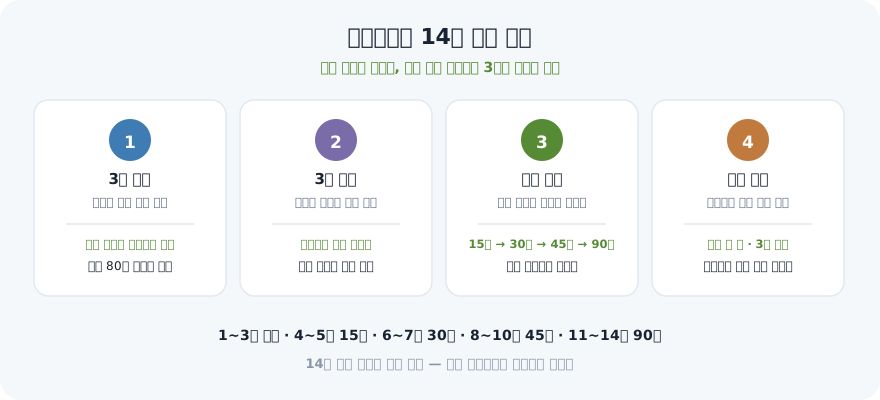
Don't set a target like "under two hours a day." Total-time targets judge you daily, and one bad day cancels everything. Instead, grow the length of the window where the phone isn't within reach. You can't overshoot that, and every day ends as a success.
| Days | What you do | Phone-free window | Pass condition |
|---|---|---|---|
| 1–3 | Measure only. Cut nothing | 0 min | You wrote down 3 days of pickups and your 2 weak windows |
| 4–5 | All notifications off (keep calls/texts) + remove your top 3 apps from the home screen | 15 min | The phone spent 15 evening minutes in another room |
| 6–7 | Move the charger out of the bedroom. Alarm goes to a separate clock | 30 min | Two nights in a row without the phone in bed |
| 8–10 | Assign a fixed replacement action to weak window #1 | 45 min | You knew in advance what you'd do instead |
| 11–12 | Clone one window into the morning (first 30 min after waking) | 60 + 30 min | First pickup moved to 30 minutes after waking |
| 13–14 | Log for 3 days again. Compare with days 1–3 | Hold | Pickups down 20% or more |
Adding fifteen minutes at a time looks trivially small. But fourteen days later you have a 90-minute phone-free window, and for most people that's the first block of uninterrupted time large enough to attempt deep work. Unlike the attempt to cut three hours at once that collapsed by day three, this version ends every day in the success column.
Troubleshooting — the moments it falls apart
You will have a bad day inside two weeks. The bad day isn't the problem. Cancelling the plan afterwards is.
| When this happens | Do this |
|---|---|
| You lost two hours in one evening | End the day there. Don't try to make it up. Keep 15 minutes tomorrow and the streak is alive |
| "See, I can't do this" shows up | Say the rule out loud: never two in a row. One is an accident, two is a new pattern |
| Work messages mean you can't put it away | Keep calls and texts on, kill everything else. Genuinely urgent things arrive as calls |
| You disabled the blocker again | Don't blame the app — swap it for physical distance. Software breaks from inside the same device |
| You need the phone as an alarm | A cheap alarm clock buys back 40 nightly minutes and the morning that follows |
| Friends say you're slow to reply | Tell people the hours in advance. "I'm off my phone 8–9" is understood almost every time |
| Two weeks in, the numbers haven't moved | Don't extend the window — re-measure the weak hours. You were probably blocking the wrong ones |
Fix the bedroom charger and the morning comes back
If you only do one thing: move the charger out of the bedroom.
Those 40 minutes after 11pm aren't just 40 minutes. They stretch how long it takes you to fall asleep, they pull your first pickup to within five minutes of waking, and as a result they shave the entire morning focus block. Fix one thing, three things follow.
The method is boring. Charger to the hallway or the kitchen, alarm on a separate clock. It's awkward for exactly two nights, and by the third it feels like it was always that way. Put it inside your evening routine as a fixed step and you stop having to decide at all.
Blocker apps vs. designed structure
| Blocker app only | Designed structure | |
|---|---|---|
| Mechanism | Asks you again every time | It isn't within reach |
| Decisions per day | Dozens | 1–2 (start and end of the window) |
| After a bad day | Delete the app → back to zero | Keep 15 minutes tomorrow, you're back |
| What it measures | Total time (insensitive) | Pickups and window length (sensitive) |
| Two weeks later | Usually back where you started | A 90-minute block of real time |
None of this means blockers are useless. It means they lose when they work alone. Layered on top of physical distance and a replacement action, they're a decent support device.
🌱 Putting it into practice with VisionDream
There's one weak point in this method: when the record breaks on a bad day, people read the break as failure. VisionDream spends two streak shields a month automatically, so a missed day doesn't erase the run, and anything you didn't finish carries forward on its own instead of being copied out again. Put your phone-free window on the Today tab (B·T·A) as a single habit check and it's done in one tap, while the calendar heatmap does what your 3-day log did — it shows you which day of the week you actually break. The 4-stage planner connects those 90 minutes to the goal above them, and what you keep grows into the Success Tree. The app is the tool; you're the one doing it.
One thing you can do in the next minute
Reading and closing the tab means tonight looks like last night. Do the one-minute version instead.
Unplug the charger and move it out of the bedroom right now. Hallway, kitchen, doesn't matter. That's the whole assignment for today. If the alarm worries you, buy a clock tomorrow — tonight, turn the volume up and leave it outside the door.
Then tomorrow morning, write down one number: yesterday's pickups. Three days of that and you'll see exactly when you break. For most people it's something narrow, like 8:40pm. That one window is all you have to fix.
Stop trying to beat your phone. Build fifteen minutes where it isn't in your hand. People who resist run out in three days; people who change the structure just live there. Plant your vision, and the fruit will come. 🌱
Frequently Asked Questions
I install blockers and keep disabling them. What should I do instead?
A blocker doesn't stop you — it asks you again every time you reach for the phone, which means you have to win dozens of negotiations a day. Nobody does that indefinitely. Instead of switching to a stricter app, switch to physical distance: a charger in another room or the inner zip of your bag adds twenty seconds of retrieval, and those twenty seconds are where a decision fits. On its own a blocker is usually bypassed within three days; layered on top of physical distance, it works fine as a support device.
How do I know whether I'm actually addicted to my phone?
Pickups tell you more than total screen time. On iPhone it's Settings → Screen Time → Pickups; on Android it's Settings → Digital Wellbeing → Unlocks. Past roughly 80 a day you're being interrupted about every twelve waking minutes, which makes sustained focus blocks of fifteen minutes or more nearly impossible. Treat that number as a design input rather than a diagnosis — instead of labelling yourself, spend three days noting which hours the pickups cluster in.
I failed on day four. Do I have to start over?
No, and the restart-from-zero math is the single most common way this plan dies. One bad day is one accident; the structure you built is still standing. Don't backfill and don't try to make it up — end the day there. The only rule that matters is never skipping two days in a row, because one miss is an accident and two is a new pattern.
My job means I can't put my phone away. Any way around that?
You're not turning everything off — you're filtering. Leave calls and text messages on and turn off every other app notification. Genuinely urgent things almost always arrive as a call. Then tell the people around you which hour you're off your phone; because you're protecting one evening hour rather than the whole day, it's understood far more often than people expect.
I only want to stop scrolling in bed. Where do I start?
Move the charger out of the bedroom and put the alarm on a separate clock. That single change is enough. Forty minutes of in-bed scrolling isn't just forty minutes — it lengthens the time it takes you to fall asleep, drags your first pickup to within five minutes of waking, and shaves your whole morning focus block. Fix one thing and three follow. It's awkward for two nights, and by the third it feels normal.
Plant a vision, and fruit will surely grow 🌱
Start in the app →Related posts
- 📲Goal-Tracking Apps — How to Pick One and Actually Finish Your Yearly Goals
- ⏰How to Stop Procrastinating — Break the Habit With Systems, Not Willpower
- 🖼️How to Make a Digital Vision Board on Your Phone (So You Actually See It Daily)
- 🌄5 Miracle Mindsets That Change Your Morning — Why Willpower Fails and What Works Instead